Get help with "how to rank higher on google maps" from a professional.
Digital marketing professionals are the best ROI for your marketing spend.
“How can I rank higher on Google Maps?”
9 out of 10 business owners will give you the same answer: get more reviews. Reviews matter enormously — but they’re one lever out of many, and the businesses parked in the Local 3-Pack in competitive categories are pulling all of them.
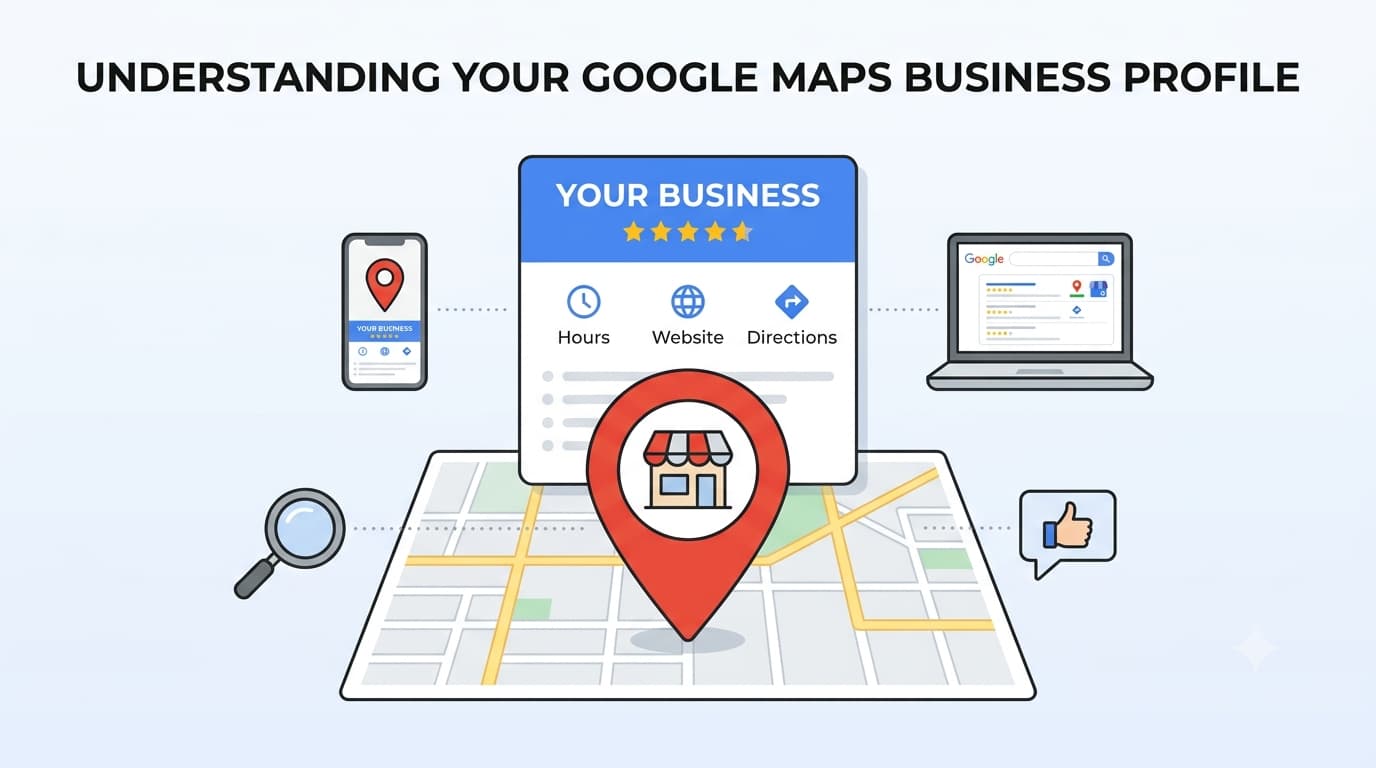
Before you get started with these 11 steps, you may want to read our “What is a Google Maps Business Profile” article to get some exposure to the jargon written here – local pack, knowledge panel, relevance, proximity and the like may be unfamiliar to you, but understanding them is crucial to following this guide properly.
If you are confident that you basically understand the concepts behind a Google Business Profile, then it’s time to get started on your 11 steps.
How to Rank Higher on Google Maps: The Steps
1. Do Competitor & Keyword Research
Before touching your GBP, research which keywords trigger a Local Pack in your target area. Not all keywords show Maps results so check each target keyword in Google to confirm a Local Pack appears.
Once you’ve confirmed the Local Pack-eligible keywords, identify the top 3 competitors ranking in for each. Record their primary category, secondary categories, number of reviews, average rating, and how keyword-rich their descriptions are.
Local SEO Pro Tool Tip: GMB Everywhere
We strongly recommend you use the GMB Everywhere Chrome Extension, as it can be a terrific tool for competitor research as well. Upgrade to the Pro setup to get all of the great features it provides.
This step gives you a baseline for what you need to beat — and sets your category and keyword strategy for all subsequent steps.
2. Take Ownership or Create A New GBP
First, search Google Maps for your business name to check if a listing already exists. Google auto-generates listings from public data, so yours may already be live — possibly with wrong information, or with duplicates.
- If a listing exists: Click “Claim this business” → “Manage now” → follow the verification prompts. If someone else has already claimed it, you can request ownership transfer through Google’s support process.
- If no listing exists: Go to business.google.com/create → enter your business name, category, and address → follow the setup wizard. Do not create a new listing if one already exists — duplicates split your reviews, confuse customers, and hurt rankings. If you find duplicates, request a merge through your GBP dashboard before proceeding.
3. Verify your Google Business Profile
Verification is non-negotiable. Unverified listings cannot be edited by the owner, are given significantly lower priority in local search rankings, and are vulnerable to edits by anyone — including competitors. Until your listing is verified, none of the optimization work in the steps below will have full effect.
In 2026, video verification is the default for most new listings. Google will ask you to record a short walkthrough video of your business — exterior signage, interior, and proof that the business operates there. It doesn’t need to be polished; it just needs to be unedited and show that your business is real. Film it on your phone. Make sure your street number is clearly visible in the exterior shot — that’s the detail Google checks most carefully.
Other methods may be offered depending on your business type and history:
- Phone or email — a code sent to your registered number or email. Usually only available for listings that already exist but haven’t been claimed.
- Postcard — Google mails a code to your business address. May still be available but no longer the default. It can take 5–14 days to arrive.
- Instant verification — if your website is already verified in Google Search Console under the same account, verification may happen automatically.
Whatever method you’re offered, use it immediately. Don’t change your business name, address, or category while verification is in progress — it resets the process.
Important for businesses with multiple locations: Each physical location requires its own verification. If you manage 10 or more locations, you can apply for bulk verification through your Business Profile Manager dashboard rather than verifying each listing individually.
Once verified, your listing becomes eligible to appear in Google Maps, the Local Pack, and the Local Finder — and you gain full control to implement every subsequent step in this guide.
4. Be consistent with NAP (Name, Address & Phone)
One of the most overlooked pillars of Google Search optimization is NAP consistency. NAP stands for Name, Address, and Phone Number — and these three data points must be absolutely identical across every online platform where your business is listed.
Google scans all online business listings and collects NAP data to inform ranking decisions. When inconsistencies are detected across listings, Google loses confidence in the accuracy of the information and may penalize the business’s Google Maps ranking as a result.
NAP consistency best practices:
- Ensure identical information across GBP, website, Naver Smart Place, Kakao Map, and all other platforms
- Use Google search operators (e.g., site:114.co.kr “business name”) to identify incorrect listings
- Update Korean national directories (한국전화번호부, 114ON) with accurate information
- Immediately update all platforms when address or phone number changes
Building Local Citations: Register your business on credible third-party platforms including Naver Smart Place, Kakao Map, TripAdvisor, and relevant industry directories. Consistent citations from trusted sources strengthen the Prominence ranking signal.
5. Choose the right Primary Category and Subcategories
Choose the most specific category that reflects your core offering — not a broad umbrella. For example, a dental practice should select “Dentist,” not “Health” or “Medical Clinic.” A marketing firm should choose “Internet Marketing Service” or “Marketing Agency,” not “Business Service.”
How to find the right categories:
- Look at what your top 3 competitors use as their primary category
- Start typing your core offering in the GBP category field and choose from Google’s predefined list
- Add up to 9 secondary categories for additional services you offer
Never select categories unrelated to your business. Category confusion is a documented suspension risk in Google’s guidelines, and mixing unrelated industries can tank your relevance signal.
6. Post Photos & Additional Content
Visual content plays an increasingly important role in Google Maps ranking. High-quality photos and videos that showcase the business’s appeal directly influence the local ranking algorithm and improve click-through rates from the Local 3-Pack.
Photo upload checklist:
- Exterior (daytime and nighttime), interior, product/service photos — minimum 5 images
- Upload fresh photos taken within the past month on a regular basis
- Use high-resolution images (1080p or above)
- Add multilingual captions to improve discoverability by foreign visitors
Fill in every field Google gives you. Most owners set up their name, address, and phone and stop there — which leaves a lot of relevance signals on the table. Your hours should be accurate and include holiday and seasonal hours; Google shows “hours may differ” warnings on profiles it doesn’t trust, and that alone costs you clicks. The Services and Products sections matter more than most people realise: every service you list by name is something Google can match a search against, so “emergency drain cleaning” or “conversational English for adults” gives you a shot at searches your category alone would never win. Add attributes too — wheelchair access, parking, women-owned, English spoken — since these now feed the filters customers use to narrow results. A profile that answers a question completely is a profile Google can confidently show.
Then keep it moving. Google favors profiles that show ongoing signs of life, and a listing that goes untouched for a month or two starts to look stale next to a competitor posting weekly. There’s no official rule here, but Google itself consistently points to the same things: current hours, fresh photos and video, and prompt replies to reviews. A realistic cadence for most businesses is a few new photos and one post a month, hours updated before every holiday, and reviews answered within a couple of days. It’s not much work once it’s a habit — and it’s the single clearest difference between the profiles that climb and the ones that plateau.
GBP Post (Update) Strategy: GBP posts do not have a strong direct impact on ranking, but they function as engagement and trust signals that keep the profile active. Publishing regular updates about events, promotions, and new offerings signals an active, well-managed business to Google.
7. Write a Keyword-loaded Description
Your GBP business description allows up to 750 characters. Use all of them. Write a description that naturally includes your primary keyword, your location, and the services you offer most.
Example for a law firm: “Personal injury attorney in Gangnam, Seoul. Our team handles car accident claims, workplace injuries, and medical malpractice cases throughout the Seoul metro area. We offer free consultations and work on contingency — you pay nothing unless we win.”
Notice the natural use of: service type, location, specific practice areas, and a differentiator. Avoid repeating the same keyword more than twice — it reads as spam and Google may suppress your listing. Do not include URLs, phone numbers, or promotional pricing in this field, as Google’s guidelines prohibit it. Keywords in your description also support the Relevance ranking signal, helping you appear for searches that don’t exactly match your business name.
8. Earn Positive Customer Reviews
Reviews are the single most powerful variable determining the Prominence signal in Google Maps ranking. The more positive reviews and higher ratings a business accumulates, the more Google treats it as trustworthy and surfaces it at the top of local search results.
In today’s AI-powered search landscape — where Google AI Mode and Gemini pull directly from review data to generate summaries — the actual words your customers use matter just as much as the star rating itself; so coach them to mention the specific service or dish by name (think: “Their leaky pipe repair saved my weekend!” or “The Truffle Mac and Cheese is absolutely unmatched!”) and you’ll start showing up for those precise long-tail searches almost effortlessly.
Review Acquisition Strategy
Google policy compliance is non-negotiable. Google strictly prohibits offering economic incentives (discounts, free items) in exchange for reviews. Violations result in review removal or account suspension.
Effective, policy-compliant review generation methods:
- Generate a review request link from the GBP admin dashboard, create a QR code, and place it on tables, checkout counters, and receipts
- Ask for reviews at the peak satisfaction moment — when a customer completes their meal, finishes a service, or makes a purchase
- Use genuine, emotionally resonant language: “If you enjoyed your visit, would you share your experience to help other travelers?”
- Share keywords that you may want them to use.*
*Do not have clients include links to websites. Reviews containing URLs will be rejected by Google automatically to prevent backlink spamming.
9. Respond to Customer Reviews
Respond promptly to every review. Thoughtful responses to positive reviews express gratitude; professional responses to negative reviews demonstrate accountability and a commitment to improvement — both of which send strong trust signals to Google and prospective customers. Responding to foreign-language reviews in the customer’s language (or English) significantly builds trust with international visitors.
10. Align Your Website with Your GBP
Your website and your Google Business Profile should work as a team. Google uses your site to confirm that the information in your profile is accurate and that your business genuinely serves the area you claim. A strong profile with a weak or inconsistent website leaves ranking points on the table.
Get the basics right first:
- Your business name, address, and phone number on your website must be an exact match with your GBP — same formatting, same abbreviations, everything.
- Add your location and primary service to your main page headings and meta description. “Gangnam English Academy” or “Hongdae Café” tells Google exactly what you are and where you are.
- Make sure your site works properly on mobile. Google indexes the mobile version of your site first.
- Add LocalBusiness schema markup to your site so Google can read your business details as structured data rather than having to interpret them. Your web developer can do this quickly, or most website platforms have a plugin for it.
Build local backlinks. A mention or link from a local blog, community website, or partner business is one of the strongest trust signals you can send. In Korea, mentions on Naver Blog and Tistory carry real weight. You don’t need many — a handful of genuinely relevant local links outperforms dozens of generic ones.
Create a FAQ page. Since late 2025, Google no longer has a Q&A section on Business Profiles. Instead, Google’s AI generates answers to customer questions automatically by pulling from your profile, your reviews, and your website. When someone asks Google whether you take walk-ins, what your prices are, or where you’re located, the AI looks for the answer — and if it can’t find it clearly stated somewhere, it guesses.
A dedicated FAQ page gives the AI a reliable source to pull from. Cover the questions customers actually ask: parking, payment methods, appointment vs. walk-in, service area, turnaround times. Write the answers in plain language, the way a customer would ask the question. Once the page is live, add FAQ schema markup so Google can parse it cleanly. If your profile or reviews already contain accurate answers to these questions, the AI will likely get it right — this just makes it more certain.
11. Track Your Performance
Once your profile is set up and optimized, you need to know if it’s actually working.
Start with the Performance report inside your GBP dashboard. It shows you how many people found your business, what they searched to find it, and what they did next — called you, asked for directions, or visited your website. Check it once a month. If those numbers are growing, the work is paying off.
The one thing Google’s own tools won’t tell you is where you actually rank on the map. Your position isn’t fixed — it changes depending on where the searcher is located. Someone two blocks away might see you in the top three; someone a mile away might not see you at all.
That’s why local SEO professionals use geo-grid tracking tools — software that crawls Google Maps across your whole area and produces a heat map showing where you rank strongly and where you’re being outranked.
Local SEO Pro Tool Tip: GMB Radar
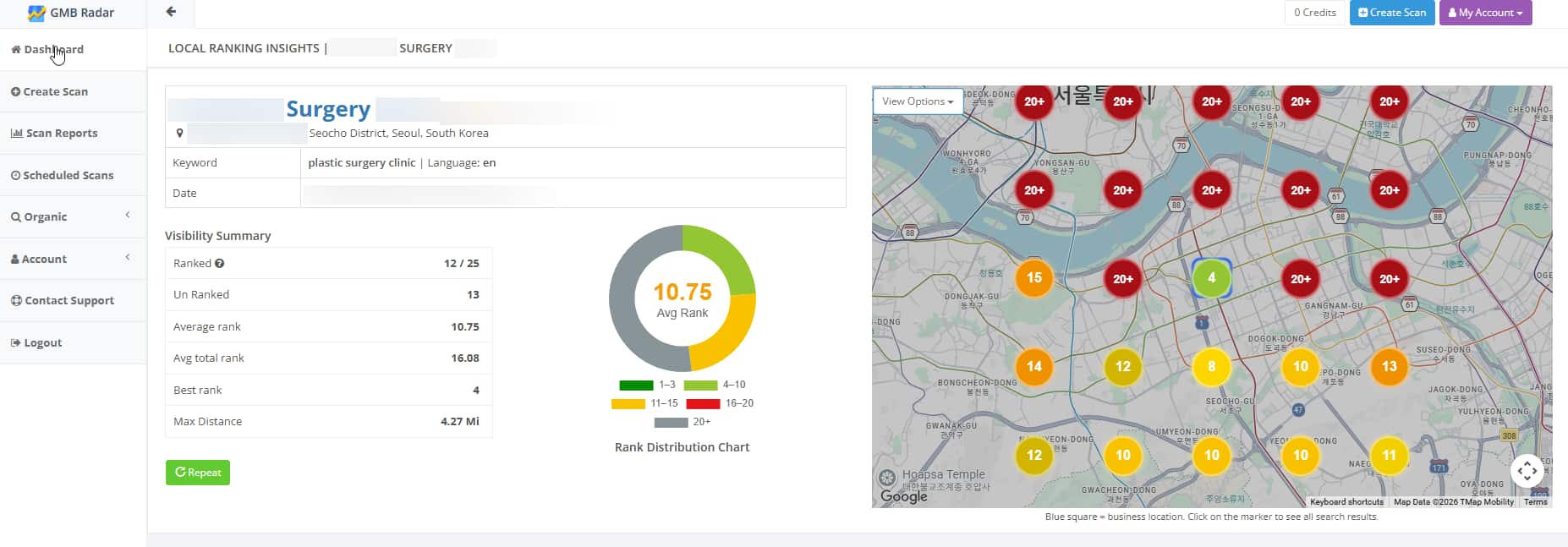
Relatively inexpensive and very effective, GMB Radar is a super-simple local rank tracker that you can use to track your results.
We use a slightly more complicated, professional-focused tool for our setup that is included as part of our client work, so get in touch if you’d like us to track results for your business.
Conclusion: Consistency Builds Google Maps Rankings
None of these steps is difficult on its own. What makes Google Maps competitive is that most businesses do two or three of them, once, and then stop.
The businesses sitting in the Local 3-Pack are the ones treating their profile as something that needs regular attention rather than a one-time setup. They’re adding photos every month, replying to reviews within a day or two, keeping their hours accurate, and checking their performance data often enough to notice when something slips. That’s the whole advantage — not a trick, just consistency that compounds.
If you’re starting from scratch, work through the steps in order. Verification first, because nothing else counts until it’s done, then categories, then reviews — that’s where the biggest gains are. If your profile is already established, pick the weakest link. Most businesses know exactly which one it is.
Rankings don’t move overnight. Expect to see meaningful change over weeks and months, not days. But the work is genuinely cumulative, and every step you complete makes the next one more effective.
Need help with it? ICC handles Google Maps and Google Business Profile optimization for businesses in Korea and beyond — from claiming and verifying your listing to review management, photo strategy, and monthly geo-grid reporting. Contact us for a consultation and we’ll take a look at where your profile stands.
Since arriving in Korea in 1995, Steve has dedicated himself to learning about Korean language and culture. Since 2017, he's been helping companies practice data-driven digital marketing.